
QESCO Online Bill Check – View & Download Duplicate Bill 2026
Checking your electricity bill online saves time, helps you avoid late payment, and gives you a printable copy even if the paper bill is delayed or misplaced. For QESCO consumers in Balochistan, the basic process is simple: keep your old bill ready, enter your Reference No or Customer ID on the QESCO web bill page, view the latest bill, then download or print the duplicate copy for payment and record keeping. Check other bills from here: www.bijlibills.com
This 2026 guide explains the full process in easy steps, including how to use the qesco online bill check option, how to get a qesco bill duplicate online, what to do if the portal shows an error, and how to pay safely.
What is QESCO?
QESCO stands for Quetta Electric Supply Company. It is the electricity distribution company responsible for supplying and managing electricity services across most of Balochistan. NEPRA lists QESCO’s area of responsibility as the entire Balochistan Province, which covers about 43% of Pakistan’s area. (nepra.org.pk)
QESCO was incorporated as a public limited utility company in 1998 and is responsible for electricity distribution in Balochistan, except District Lasbela, according to QESCO’s investment plan submitted through NEPRA. (nepra.org.pk)
If your electricity connection is under QESCO, you can use the online duplicate bill facility to view your latest payable amount, due date, billing month, and other details without waiting for the printed bill.
What you need before checking your QESCO bill online
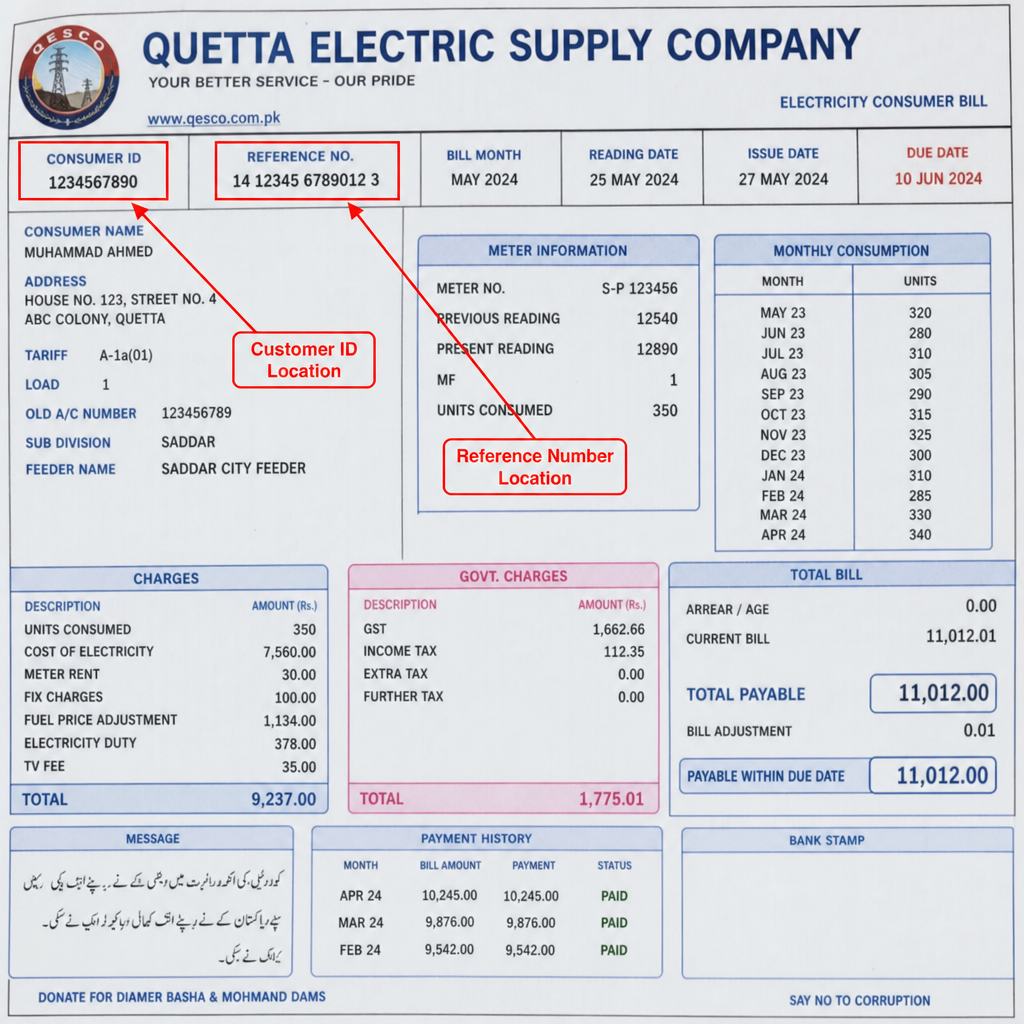
Before you start, keep one previous QESCO bill with you. You normally need one of the following details:
- Reference Number: The main bill identification number printed on your QESCO bill.
- Customer ID: Another account identifier available on many electricity bills.
- Consumer details: Name, address, meter number, or connection details may help you confirm you opened the correct bill, but they are usually not enough by themselves to search the bill online.
The official QESCO web bill page powered by PITC provides bill search options for Reference No and Customer ID. (bill.pitc.com.pk) Search results for the same QESCO web bill portal also show that the Reference No field expects a valid 14-digit reference number. (bill.pitc.com.pk)
If you cannot find these numbers, look near the top section of an old printed bill. Copy the number exactly as printed. Avoid spaces, extra characters, or typing mistakes.
Step-by-step: how to check QESCO online bill
Follow these steps to view your qesco online bill on mobile, laptop, or desktop.
1. Open the QESCO web bill page
Open your browser and go to the QESCO web bill page. The page is shown as QESCO Web Bill Powered by PITC, and it is designed to search your electricity bill online. (bill.pitc.com.pk)
If the official QESCO website changes its menu or layout in the future, look for options such as:
- Online Bill
- Duplicate Bill
- Web Bill
- Consumer Bill
- PITC Bill
Because government and utility portals may change over time, always verify that you are using a trusted QESCO or PITC-related page before entering bill information.
2. Choose Reference No or Customer ID
On the bill search page, select the option you want to use:
- Choose Reference No if you have the reference number from your old bill.
- Choose Customer ID if your bill has a customer ID and the portal accepts it.
Most consumers use the reference number because it is widely printed on electricity bills and is commonly requested by bill payment apps.
3. Enter your number carefully
Type the number without spaces. Check every digit before submitting.
Common mistakes include:
- Missing one digit
- Adding spaces between number groups
- Entering an old or changed reference number
- Using a meter number instead of reference number
- Selecting Customer ID but entering Reference No, or the opposite
A small typing error can show “invalid reference number” or “bill not found,” so it is worth checking the number twice.
4. Submit the bill search
After entering the correct detail, submit the form. If the record is available, your latest QESCO bill should open on the screen.
Check these details before paying:
- Consumer name
- Service address
- Billing month
- Units consumed
- Current charges
- Arrears, if any
- Due date
- Amount payable within due date
- Amount payable after due date
If the name or address does not match your connection, do not pay immediately. Recheck the reference number or confirm from your nearest QESCO office.
5. View the full bill
The online duplicate bill should show the same key information you need for payment. You can use it to confirm your amount and due date, even if the printed bill has not arrived.
For many users, the fastest routine is:
- Open the online bill page.
- Enter Reference No.
- View the latest bill.
- Save a copy.
- Pay through your preferred channel.
This is the simplest way to complete a qesco online bill check each month.
How to download QESCO duplicate bill online
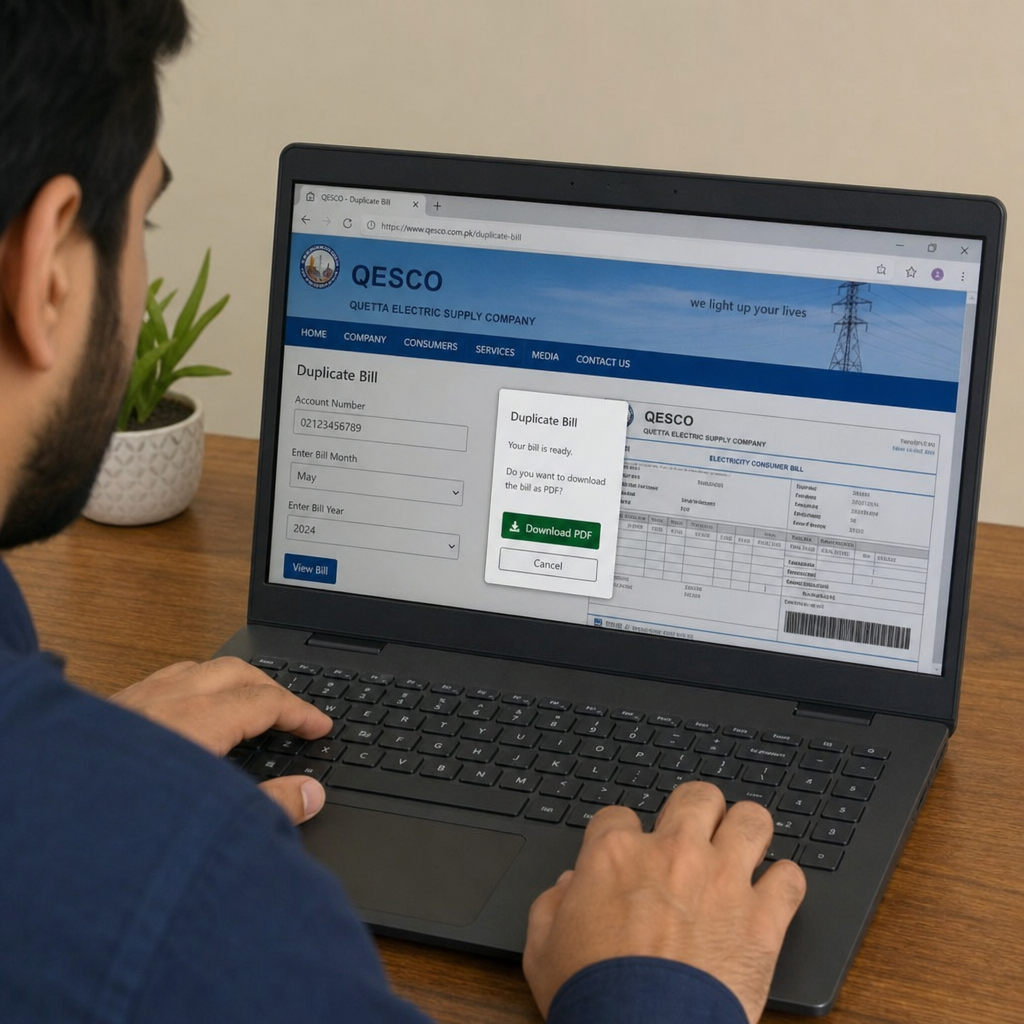
Once your bill is visible, you can save a duplicate copy for later use.
On mobile
- Open the bill on your phone browser.
- Tap the browser menu.
- Select Share, Print, or Save as PDF, depending on your phone.
- Choose Save to Files, Downloads, or a PDF app.
- Rename the file with the month, such as “QESCO Bill July 2026.”
On laptop or desktop
- Open the bill in your browser.
- Press Ctrl + P on Windows or Command + P on Mac.
- Choose Save as PDF as the printer option.
- Select the folder where you want to save it.
- Click Save.
Saving a PDF is useful if you need the bill for rent records, office reimbursement, tax records, or proof of residence.
How to print QESCO duplicate bill
If you need a paper copy, print the duplicate bill after opening it online.
- Open the QESCO duplicate bill on your screen.
- Press Ctrl + P or tap Print in your browser menu.
- Select your printer.
- Use A4 paper size if available.
- Keep the scale at “fit to page” if the bill is cutting off.
- Print the bill.
- Check that the reference number, amount, due date, and barcode are visible.
A clear printed duplicate bill is helpful for bank counters, shop payments, and personal filing. If the print is blurry, download the PDF first and print from the saved file.
How to check QESCO bill without an old paper bill
If you do not have any previous bill, try these options:
- Ask your landlord, previous tenant, or property owner for an old bill copy.
- Check your WhatsApp, email, or gallery if someone sent you a bill photo before.
- Look for a saved PDF in your phone downloads.
- Check your banking or wallet app payment history for the saved biller details.
- Visit your nearest QESCO customer service office with connection details.
You may be able to identify the bill through the address and meter details at a QESCO office, but for online checking, the reference number or customer ID is normally the fastest route.
Common problems and how to fix them
Online bill portals work well most of the time, but errors can happen. Here are the most common issues and practical fixes.
Problem: QESCO bill website is down
If the page is not opening, loading slowly, or showing a server error:
- Wait a few minutes and try again.
- Refresh the page.
- Try a different browser such as Chrome, Safari, Firefox, or Edge.
- Switch from mobile data to Wi-Fi, or from Wi-Fi to mobile data.
- Clear browser cache.
- Try late night or early morning when traffic may be lower.
- If the due date is near, use an already saved bill or visit an authorized payment point.
Because the QESCO web bill system is powered through PITC, temporary downtime can affect bill lookup. The official page itself identifies the service as QESCO Web Bill powered by PITC. (bill.pitc.com.pk)
Problem: wrong reference number
If you see an invalid reference number message, check the following:
- Did you enter all digits correctly?
- Did you accidentally type the customer ID in the reference number field?
- Did you include spaces, dashes, or extra letters?
- Are you using the latest bill number from the current connection?
- Has your connection, meter, or account recently changed?
If the issue continues, compare your number with a recent printed bill or contact QESCO support.
Problem: bill not found
A “bill not found” message can appear when:
- The latest bill has not been uploaded yet.
- The billing cycle is still being processed.
- The reference number is old or incorrect.
- The connection is new.
- The portal is temporarily unable to fetch records.
Try again later. If your physical bill has arrived but the online bill is still not showing, use the printed bill for payment and check with QESCO if needed.
Problem: details do not match
If the name, address, or amount looks wrong:
- Do not rush to pay.
- Recheck the reference number.
- Compare with your previous month’s bill.
- Confirm whether arrears or adjustments were added.
- Visit or contact QESCO for correction if the bill appears incorrect.
For billing disputes, keep copies of previous paid bills, meter pictures, and payment receipts.
QESCO bill payment options in Pakistan
After downloading or viewing your duplicate bill, you can pay through any available channel that supports QESCO bill payment. Availability may vary by bank, wallet, city, and service status, so always confirm the biller name and amount before paying.
Common payment options include:
- Mobile banking apps
- Internet banking
- Bank branches
- ATMs
- Authorized retail agents
- Mobile wallets
- Utility bill payment counters
For example, JazzCash’s bill payment flow includes selecting bill payments, choosing a bill category, selecting the biller company, entering the reference number, confirming details, and entering MPIN. JazzCash also states that electricity bills can be paid through its bill payment service and that confirmation is received in the app and by SMS. (jazzcash.com.pk)
Meezan Bank lists Quetta Electric Supply Company among its utility bill payment billers and says bills can be paid through Meezan Internet Banking. (meezanbank.com) UPaisa also lists QESCO under its electricity bill payment companies. (upaisa.com)
When using any payment app, follow this safe process:
- Open the app.
- Select Bill Payment or Utility Bills.
- Choose Electricity.
- Select QESCO or Quetta Electric Supply Company.
- Enter the reference number.
- Confirm the consumer name and amount.
- Complete payment only if the details match.
- Save the receipt or screenshot.
Safety tips for checking and paying QESCO bill online
Use these precautions whenever you check or pay your electricity bill online:
- Use the official QESCO/PITC bill page or a trusted payment app.
- Do not enter your banking PIN, OTP, or wallet MPIN on a bill-checking website.
- A QESCO bill lookup normally needs bill identifiers, not your bank password.
- Always confirm the consumer name before paying.
- Save the payment receipt until the next bill shows the payment adjustment.
- Avoid paying through unknown agents who cannot provide a receipt.
- Do not share screenshots containing your full bill details publicly.
- If someone calls and asks for OTP or MPIN to “fix” your bill, do not share it.
- Use updated mobile apps from official app stores.
- Check the amount after due date if you are paying late.
These habits help protect you from wrong payments, fake portals, and payment confirmation issues.
Tips to manage your QESCO bill every month
A simple monthly routine can prevent missed due dates:
- Check your bill online as soon as the billing month starts.
- Save your reference number in a secure notes app.
- Download a PDF copy every month.
- Keep payment receipts in a folder.
- Take a meter reading photo around the reading date if you track usage.
- Compare units consumed with the previous month.
- Pay before the due date to avoid late payment charges.
- If the amount looks unusually high, review units, arrears, taxes, and adjustments before paying.
The qesco bill duplicate online option is especially useful for tenants, office administrators, shop owners, and households where the printed bill often arrives late.
FAQs
How can I check my QESCO bill online in 2026?
Open the QESCO web bill page, choose Reference No or Customer ID, enter the number from your old bill, and submit the form. If the record is available, your latest bill will appear on the screen.
What is required for qesco online bill check?
You need your QESCO Reference Number or Customer ID. The QESCO web bill page provides search options for Reference No and Customer ID. (bill.pitc.com.pk)
Can I download a QESCO duplicate bill?
Yes. After opening the bill online, use your browser’s print option and select Save as PDF. You can also print it directly if you need a hard copy.
Is a duplicate QESCO bill useful for payment?
Yes. A duplicate bill contains the key bill details needed for payment, including reference number, amount, and due date. Always make sure the printed or saved copy is clear and readable.
Can I check QESCO bill by CNIC or mobile number?
For standard online bill lookup, use the Reference Number or Customer ID printed on your bill. If you only have a CNIC, mobile number, address, or meter number, contact QESCO customer service for guidance.
Why is my QESCO bill not showing online?
The bill may not be uploaded yet, the portal may be temporarily down, or the reference number may be incorrect. Recheck the number and try again later.
What should I do if the QESCO website is not working?
Try refreshing the page, changing your browser, switching internet connection, or checking again after some time. If the due date is close, use a previous saved copy or visit an authorized payment channel.
Can I pay my QESCO bill through mobile wallets?
QESCO bill payment may be available through supported wallets and banking apps. JazzCash, for example, supports electricity bill payments through its bill payment process, while UPaisa lists QESCO under electricity billers. (jazzcash.com.pk)
How do I know my online payment is successful?
Check the confirmation screen, SMS, and transaction history in your app. Save the receipt. If the payment is delayed or not reflected, contact the app, bank, or payment provider with your transaction ID.
Is the QESCO online bill portal always the same?
Utility portals can change design, links, and field names over time. The core idea remains the same: use your official bill identifiers to search, view, download, and print your duplicate bill. If the portal changes, follow the latest instructions shown on the official QESCO or PITC page.
QESCO Online Bill – Customer Support, Map, Helplines & FAQs
Use this SEO-ready section on your QESCO online bill page. It includes the official web-bill link, head office map, complaint numbers, customer service centers, Balochistan service areas, operational structure, safety notice, 20 FAQs and FAQ schema.
QESCO Map and Head Office
QESCO Helpline Numbers and Complaint Emails
| Channel | Contact | Use It For | Keep Ready |
|---|---|---|---|
| National Electricity Complaint Centre | 118 | Outages, broken wires, transformer faults, billing, meter and voltage complaints. | Reference number, address, landmark and mobile number. |
| SMS Complaint | 8118 | Written complaint registration by SMS. | Reference number, issue type, contact number and customer name. |
| QESCO Toll-Free Line | 0800-84338 | Electricity theft reporting and official QESCO support. | Location and accurate incident details. |
| CCMS Email | [email protected] | Written complaint registration and follow-up. | Bill copy, complaint summary, phone number and evidence. |
| QESCO Headquarters | 081-9201445 | Customer service and head-office support. | Consumer details and previous complaint ticket. |
QESCO Customer Care Centers
For urgent faults use 118 or 8118. For document-based billing issues, customers may visit the nearest QESCO customer service or sub-division office.
| Office / Center | Type | Location / Coverage | Phone / Support |
|---|---|---|---|
| QESCO Headquarters Customer Service Centre | Head office / escalation | Main Zarghoon Road, beside CCPO Office, Quetta Cantt | 081-9201445 |
| Liaquat Bazar Customer Service Centre | Walk-in customer service | Main Liaquat Bazaar, in front of City Police Station, First Floor, Fire Brigade Plaza, Quetta | 118 / official local directory |
| Central Circle | Operational support | Quetta city and nearby service territory | 118 / 8118 |
| Pishin Circle | Operational support | Pishin, Chaman and surrounding areas | 118 / 8118 |
| Loralai Circle | Operational support | Loralai, Zhob and surrounding areas | 118 / 8118 |
| Sibi Circle | Operational support | Sibi and surrounding areas | 118 / 8118 |
| Khuzdar Circle | Operational support | Khuzdar, Kalat and surrounding areas | 118 / 8118 |
| Mekran Circle | Operational support | Turbat, Gwadar, Panjgur and surrounding areas | 118 / 8118 |
Local circle, division and sub-division numbers can change. Verify a local number through the QESCO phone directory or the contact details printed on the customer’s latest bill.
QESCO Service Areas in Balochistan
QESCO’s official website states that it supplies electricity across Balochistan except District Lasbela. Important service locations include:
QESCO Operational Circles, Divisions and Sub-Divisions
*Structure note: These figures are taken from the Government of Pakistan Power Division Year Book 2021–22. An older Auditor-General report lists 56 operation sub-divisions. Because restructuring may occur, verify the newest figure with QESCO before presenting it as a current statutory total.
How to Register a QESCO Complaint
Collect Details
Keep the Reference No, Customer ID, meter number, address, mobile number and evidence ready.
Choose a Channel
Call 118, SMS 8118, submit through CCMS, or visit the relevant QESCO office.
Explain Clearly
State whether the issue concerns billing, meter reading, outage, low voltage, transformer or a dangerous wire.
Save the Ticket
Keep the complaint ticket number and use it for tracking and escalation.
Scam and Electrical Safety Notice
Never send money to an individual account for QESCO bill correction, meter replacement, new connection, fine cancellation, transformer repair or complaint handling.
Do not transfer money through Easypaisa, JazzCash, a personal bank account or cash to an unofficial person. Use official payment and complaint channels only.
For a broken wire, sparking pole, transformer fire or current leakage, stay away from the location and immediately call 118.
QESCO Online Bill Check
The official PITC QESCO Web Bill page supports bill search through Reference No or Customer ID. Once the bill opens, customers can review the billing month, due date, payable amount, readings and arrears, then print or save the duplicate bill.
QESCO FAQs
How can I check my QESCO online bill?
What information is required for QESCO bill check online?
Can I download a QESCO duplicate bill?
What is the QESCO complaint helpline?
Can I register a QESCO complaint through SMS?
What is QESCO’s toll-free complaint number?
What is the CCMS complaint email?
Where is the QESCO head office?
What is the QESCO head office phone number?
Which areas are covered by QESCO?
How many operation circles does QESCO have?
How many operation divisions does QESCO have?
How many operation sub-divisions does QESCO have?
Can I check a QESCO bill using CNIC?
Where is the QESCO reference number on the bill?
What should I do when the QESCO online bill is not showing?
How can I complain about an incorrect QESCO meter reading?
What should I do if an electricity wire is broken?
Can someone ask for personal payment to correct my QESCO bill?
Can I track a QESCO complaint online?
Source and Verification Note
Core information in this section is based on the official QESCO website, the official PITC QESCO Web Bill portal, PITC CCMS, and the Government of Pakistan Power Division Year Book. Confirm local telephone numbers and organizational restructuring before publishing future updates.