Independent helper page. The bill opens on the official PITC website (bill.pitc.com.pk) and your number is not stored by BijliBills.com.
GEPCO Bill Online Check – Download Duplicate Bill
If you have not received your printed electricity bill or it has been misplaced, or you want to be sure of the amount before the due date, the fastest way to find out your current electricity bill is through a GEPCO online bill check. For consumers in GEPCO areas it is easy, keep your reference number handy, open the online bill service, enter the required digits and see or print your duplicate bill.
GEPCO Bill Online (GEPCO) is short for Gujranwala Electric Power Company. As per the official business plan and regulatory documents, GEPCO is providing electricity to the consumers of Gujranwala, Hafizabad, Sialkot, Narowal, Gujrat and Mandi Bahauddin. Many people search for this service with different keywords like gepco bill check, bijli bill check, wapda bill online, gujranwala electric bill online check, gapco bill check online or electricity bill online check gepco, but they all want the same thing that is to get the latest GEPCO electricity bill without waiting for the paper version. Also Check other bills at Here.
What Is a GEPCO Online Bill?
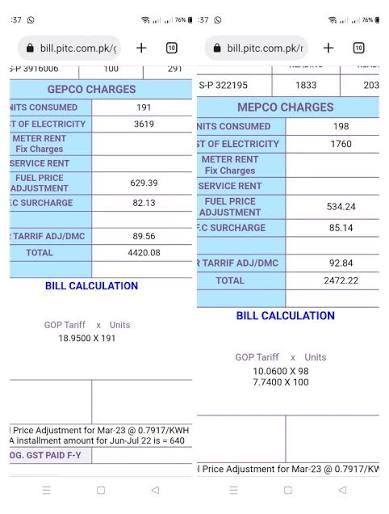
GEPCO Online Bill or GEPCO Bill Online is an electronic version of your electricity bill that you can view through an online system. You will usually see the same key data on the printed bill including the billing month, reference number, customer details, units consumed, amount due, due date and late payment surcharge where applicable.
This service is usually needed by consumers when:
Printed bill held up.
The original bill is lost or is damaged.
Duplicate bill required for payment.
Need to check the due date quickly.
The consumer wants to check the bill amount before paying through a bank, wallet or mobile app.
A tenant, landlord, shopkeeper or office manager needs a copy for their records.
GEPCO Duplicate Bill Print Online The official GEPCO Duplicate Bill page asks users to enter a 14 digit numeric reference number without spaces. It also notes some reference numbers may have changed and consumers should use the reference number on their latest electricity bill. ( gepco.com.pk )
The official GEPCO duplicate bill page asks users to enter a 14-digit numeric reference number without spaces. It also notes that some reference numbers may have been revised and that consumers should use the reference number printed on their latest electricity bill.
How to Check GEPCO Bill Online by Reference Number
For most users, the easiest method is GEPCO bill check by reference number. The reference number is the main identifier used to retrieve your bill.
Follow these steps:
Take any previous GEPCO electricity bill.
Find the 14-digit reference number printed on the bill.
Enter the digits exactly as shown, but without spaces or dashes.
Submit the form through the bill checking page.
Wait for the duplicate bill to load.
Review the amount, due date, billing month, and units consumed.
Download, save as PDF, or print the bill if needed.
This process is often searched as gepco online bill check, gepco bill online check, online gepco bill check, bill check online gepco, gapco bill check, bijli ka bill online check, and electric bill check online. The wording may differ, but the required number is usually the same: your 14-digit reference number.
Where to Find the 14-Digit Reference Number
Your reference number is printed on your GEPCO bill on GEPCO Bill Online site . It is usually located near the upper portion of the bill, close to your consumer information. It may appear with spaces on the printed bill for readability, but when checking online, enter only the digits.
For example, if the bill shows the number with spaces, type it as one continuous number in the online form. Do not add:
Spaces
Hyphens
Slashes
Letters
Extra symbols
A small typing mistake can cause a “bill not found” or “invalid reference number” message. If your old bill reference number no longer works, use the latest printed bill because GEPCO notes that some reference numbers have been revised. (gepco.com.pk)
Can You Check GEPCO Bill by CNIC?
Many users search for gepco online bill check by cnic or gepco bill check by cnic, but for normal duplicate bill checking, the reference number remains the most reliable method. The public duplicate bill service is designed around the numeric reference number printed on the bill.
However, complaint and account-verification systems may ask for additional details. The PITC Customer Complaint Management System shows options such as reference number, contact number, and CNIC for complaint-related lookup and verification, while also stating that reference numbers must be 14 digits. This means CNIC may help in some support or complaint contexts, but it should not be confused with the standard duplicate bill lookup process. (ccms.pitc.com.pk)
If you do not have your reference number, try these options:
Check an old printed GEPCO bill.
Ask the property owner or previous tenant for a bill copy.
Check a bank payment receipt or mobile banking transaction record.
Visit your GEPCO subdivision office with connection details.
Use complaint or customer support channels if you need account verification.
What Is a GEPCO Duplicate Bill?
A GEPCO duplicate bill or GEPCO Bill Online is a copy of your current or recent electricity bill that you can use when the original printed bill is unavailable. People search for this as duplicate bill gepco, gepco duplicate bill, gepco online bill duplicate, gepco duplicate bill online check, duplicate bill electricity, electricity bill duplicate, or simply duplicate bills.
A duplicate bill can be useful for:
Paying your electricity bill on time.
Keeping a monthly household record.
Submitting proof of address where accepted.
Verifying current charges before payment.
Sharing the bill with a landlord, tenant, accountant, or office administrator.
GEPCO’s official duplicate bill page also states that all branches of all commercial banks are authorized to collect electricity bills. This is useful if you print a duplicate bill and want to pay it physically rather than through a digital channel. (gepco.com.pk)
How to Print or Download Your GEPCO Web Bill
Once the gepco web bill opens, you can save or print it using your browser. The exact option depends on your phone, browser, or computer, but the basic process is similar.
On a laptop or desktop:
Open the bill.
Press the print option in your browser.
Choose your printer if you need a paper copy.
Choose “Save as PDF” if you want a digital copy.
Save the file with a clear name, such as “GEPCO Bill July 2026.”
On a mobile phone:
Open the bill in your browser.
Tap the menu or share button.
Choose print, save, or share depending on your phone.
Save it as a PDF or send it to yourself through email or a messaging app.
A saved bill helps you avoid last-minute stress. It also gives you a quick record of units, due date, and amount if you later need to confirm payment or raise a complaint.
How to Pay GEPCO Bill After Online Checking
After you complete your gepco bill online check, you can pay through the payment channel available to you. Common options include commercial bank branches, mobile banking apps, internet banking, ATMs, authorized payment shops, and other bill payment services.
Before paying, always compare these details:
Distribution company name: GEPCO
Reference number
Billing month
Amount within due date
Amount after due date
Consumer name or address, if displayed
If the information does not match your connection, do not pay in a hurry. Recheck the reference number and confirm that the bill belongs to your premises.
Understanding Important Details on Your GEPCO Electricity Bill
A GEPCO bill may look complicated at first, but most consumers only need to understand a few key fields.
Billing Month Of GEPCO Bill Online
This tells you which month the bill belongs to. Always confirm the billing month before paying, especially if you are checking near the start or end of a month.
Due Date Of GEPCO Bill Online
The due date is the last date to pay the bill without a late payment surcharge. If you pay after this date, the higher amount may apply.
GEPCO Bill Online Amount Due
This is the amount payable before the due date. The CCMS bill detail area shows fields for bill month, due date, amount due, and late payment surcharge, which are the details most consumers check before payment. (ccms.pitc.com.pk)
GEPCO Bill Online Late Payment Surcharge
This is the extra amount added if the bill is paid after the due date. If your bill is already overdue, check whether the payment app or bank is showing the updated payable amount.
GEPCO Bill Online Units Consumed
Units consumed show how much electricity was used in the billing cycle. Comparing monthly units helps you understand whether your usage is increasing because of air conditioners, heaters, water pumps, commercial equipment, or seasonal changes.
GEPCO Bill Online Arrears or Previous Balance
If an amount from a previous month remains unpaid or is adjusted later, it may appear as arrears. Do not ignore this section if your current bill seems higher than expected.
GEPCO Bill Online Taxes, Surcharges, and Adjustments
Electricity bills in Pakistan can include several charges beyond basic energy usage. These may include taxes, fuel-related adjustments, quarterly adjustments, and other government or regulatory charges. Because these amounts can change, use your official bill as the final source instead of relying only on a rough calculator.
GEPCO Bill Calculator: Useful but Not Final
A GEPCO bill calculator can help estimate your expected electricity bill, especially if you know your monthly units. It is useful for planning, but it should not be treated as the final payable amount.
Your actual bill may differ because of:
Tariff category
Protected or unprotected consumer status
Taxes and duties
Fuel price adjustment
Quarterly tariff adjustment
Arrears
Meter rent or service charges, if applicable
Late payment surcharge
Government notifications or regulatory changes
Use a calculator for estimation, then confirm the final amount through your gepco online bill or printed bill before making payment.
GEPCO Bill Online Common Errors During GEPCO Online Bill Checking
If your bill does not open, do not panic. Most issues are simple and can be fixed in a few minutes.
GEPCO Bill Online Incorrect Reference Number
This is the most common reason. Recheck all 14 digits and make sure you did not enter spaces, dashes, letters, or an old revised number.
GEPCO Bill Online Wrong Company Selected
If you live in a border area or recently moved, make sure your bill is actually from Gujranwala Electric Power Company. Consumers sometimes confuse GEPCO with LESCO, FESCO, IESCO, MEPCO, or other DISCOs.
GEPCO Bill Online New Connection Not Updated Yet
If your connection is new, the bill may not appear immediately. Wait for the first regular billing cycle or contact the subdivision office.
GEPCO Bill Online Current Month Bill Not Uploaded
Sometimes the current month’s bill is not available yet. Check again later or use the previous month’s record until the latest bill appears.
GEPCO Bill Online Browser or Internet Issue
Try refreshing the page, clearing cache, switching browsers, or using a stable internet connection.
GEPCO Bill Online Payment Status Delay
If you paid recently, the status may not update instantly everywhere. Keep your payment receipt, transaction ID, or bank confirmation until the system reflects the payment.
GEPCO Online Bill Check for Gujranwala and Nearby Areas
The phrase gepco duplicate bill online check near gujranwala is common because GEPCO’s head office and identity are strongly associated with Gujranwala. But GEPCO is not limited to one city. Its service area includes multiple districts, including Gujranwala, Sialkot, Gujrat, Hafizabad, Mandi Bahauddin, and Narowal. (gepco.com.pk)
That means consumers may search for:
gujranwala electric bill online check
gepco bill online check gujranwala
gujranwala bill check
gujranwala electricity bill
gepco gujranwala online bill check
online bill check pakistan gepco
All of these searches generally refer to the same bill checking process for GEPCO consumers.
Is GEPCO the Same as WAPDA?
GEPCO Bill Online and WAPDA bill online, wapda online bill, or bijli ka bill when they mean their electricity distribution company bill. In daily language, this is common. Technically, however, your electricity bill is issued by the distribution company responsible for your area. For Gujranwala-region consumers, that company is GEPCO.
So if your bill says GEPCO, use the GEPCO bill checking method rather than another company’s portal. If your bill belongs to another DISCO, use that company’s bill service.
What If You Search “Gapco,” “Gecpo,” “Gipco,” “Gepgo,” or “GPCO”?
A lot of users misspell GEPCO while searching. Common search terms include gapco, gapco bill check, gapco online bill, gecpo, gpco, gepgo, and gipco. These usually refer to the same company: Gujranwala Electric Power Company. GEPCO Bill Online here to help you!
If you typed a misspelled version and still reached a bill checking guide, just remember the correct name is GEPCO. The most important thing is not the spelling in your search query; it is entering the correct 14-digit reference number from your own bill.
Can You Check Previous Month GEPCO Bill Online?
Many users search for gepco online bill check previous month. The online bill page usually focuses on the current or latest available bill. Some systems or payment apps may show limited payment history, and your own saved PDFs can help build a personal record.
GEPCO Bill Online For better monthly tracking:
Save each duplicate bill as a PDF.
Name the file by month and year.
Keep payment receipts with bill copies.
Record monthly units in a notebook or spreadsheet.
Compare summer and winter usage separately.
If you need an official older record, contact the relevant GEPCO office or customer service channel.
How to Handle a High GEPCO Bill
A high electricity bill can happen for many reasons. Before filing a complaint, review the bill carefully.
Check these items first:
Current meter reading on the bill
Actual reading visible on your meter
Units consumed compared with last month
Arrears or unpaid balance
Fuel price adjustment or other adjustments
Change in usage pattern
Seasonal appliances such as AC, heater, geyser, or motor
Possible meter reading mistake
GEPCO Bill Online: If the meter reading on the bill is higher than the actual meter reading, take a clear photo of the meter with date and time if possible. Keep your duplicate bill copy and payment history ready before contacting support.
GEPCO Complaints and Support
GEPCO Bill Online: For electricity-related complaints, GEPCO’s duplicate bill page displays 118 for 24-hour contact and 8118 for SMS complaints. These channels are useful for power supply issues, billing concerns, outage reporting, and follow-up. (gepco.com.pk)
You can also use the PITC Customer Complaint Management System. The CCMS portal allows complaint registration and includes options such as tracking by reference and tracking by ticket. The complaint form asks for consumer and complaint details, including complaint category, type, and description. (ccms.pitc.com.pk)
GEPCO Bill Online: When submitting a complaint, keep these details ready:
14-digit reference number
Consumer name
Mobile number
Address or nearest place
Bill month
Meter photo, if relevant
Clear description of the issue
Previous complaint number, if any
Always note your complaint ticket number. If the issue is not resolved, the ticket number helps with follow-up and escalation.
Safety Warning: Avoid Electricity Bill Scams
Be careful if someone calls, messages, or visits claiming they can reduce your GEPCO bill through a direct personal payment. The CCMS portal displays a public warning telling consumers not to send money for bills, meters, repairs, fine cancellation, bill adjustment, new connection, replacement, or other electricity services through Easypaisa, JazzCash, or direct bank transfer to an individual account. It also advises consumers to report suspicious demands at the 118 helpline. (ccms.pitc.com.pk)
To stay safe:
Pay only through authorized channels.
Never send bill money to a personal account.
Do not share unnecessary personal information.
Keep payment receipts.
Confirm suspicious messages through official complaint channels.
Do not trust anyone promising illegal bill reduction.
Tips to Reduce Your GEPCO Electricity Bill or GEPCO Bill Online Check
Checking your electric bill online helps you stay informed, but reducing usage is what lowers the bill over time. Small habits can make a noticeable difference.
Try these practical steps:
Switch off lights, fans, and appliances when not in use.
Use energy-efficient LED bulbs.
Clean AC filters regularly.
Set air conditioners at a moderate temperature.
Avoid running heavy appliances at the same time if possible.
Use natural light and ventilation when practical.
Check for faulty wiring or appliances that consume extra power.
Defrost old refrigerators and keep door seals tight.
Turn off chargers and standby devices.
Monitor units weekly during high-consumption months.
For households and shops, the most useful habit is to compare units each month. If your units suddenly increase, investigate early instead of waiting for a very high bill.
Best Practices for Smooth Online Bill Checking & GEPCO Bill Online
To make online bill checking easier every month, keep your bill information organized.
Recommended habits:
Save your reference number in your phone contacts.
Keep a photo of your latest bill.
Download a duplicate bill before the due date.
Save payment receipts until the next bill arrives.
Use the same spelling and digits every time.
Check the billing month before payment.
Verify the amount in your payment app before confirming.
Keep landlord and tenant responsibilities clear.
If you manage multiple meters for a home, shop, factory, school, or office, label each reference number by location. This avoids paying the wrong bill.
Quick Guide: Online Bill Check Karne Ka Tarika
GEPCO Bill Online: If you want the process in simple Roman Urdu style, here is the basic online bill check karne ka tarika:
Purana GEPCO bill nikalein.
14-digit reference number dhoondein.
Online bill check page open karein.
Reference number baghair space ke enter karein.
Check bill par click karein.
Bill amount, due date, aur units verify karein.
Duplicate bill print ya PDF mein save kar lein.
Due date se pehle payment kar dein.
This is the simplest way to complete bijli ka bill online check without visiting an office.
GEPCO Bill Online: You can check it by entering your 14-digit reference number from a previous GEPCO bill. The official duplicate bill page asks for a 14-digit numeric reference number without spaces. (gepco.com.pk)
Can I download a GEPCO duplicate bill?
Yes. Once the bill opens, use your browser’s print or save option to download it as a PDF or print a paper copy.
Is GEPCO online bill checking free?
Online duplicate bill checking is generally available without visiting an office. You only need the correct reference number and internet access.
Can I check GEPCO bill without reference number?
For standard duplicate bill lookup, the reference number is the main requirement. If you do not have it, check an old bill, payment receipt, or contact GEPCO support for guidance.
Can I check GEPCO bill by meter number?
Meter number is useful for technical identification, but the usual online duplicate bill method relies on the bill reference number.
Can I pay a duplicate GEPCO bill?
A duplicate bill is commonly used for payment when the printed bill is lost or delayed. GEPCO’s duplicate bill page notes that commercial bank branches are authorized to collect electricity bills. (gepco.com.pk)
Why is my GEPCO bill not showing online?
Possible reasons include an incorrect reference number, revised reference number, current bill not uploaded yet, temporary server issue, or a new connection that has not entered the regular billing cycle.
What is PITC GEPCO bill?
PITC stands for Power Information Technology Company. It supports online systems used for electricity billing and complaints. The CCMS contact page identifies PITC as Power Information Technology Company and shows CCMS as powered by PITC. (ccms.pitc.com.pk)
GEPCO Bill Online Final Checklist Before Paying Your GEPCO Bill
Before you pay, quickly confirm: GEPCO Bill Online is your if not, then don’t pay
The bill belongs to GEPCO.
The reference number matches your connection.
The billing month is correct.
The amount due is clear.
The due date has not passed.
Any arrears or surcharge are understood.
You are paying through an authorized channel.
You have saved the payment receipt.
A GEPCO online bill check takes only a few minutes, but it can prevent late fees, wrong payments, and unnecessary office visits. Whether you call it gepco online bill, bill check gepco, electricity bill check online, bijli bill check, or online bill check gepco 2026, the safe method is the same: use the correct 14-digit reference number, verify the bill details, and pay through a trusted channel.
GEPCO Customer Care Information
GEPCO Customer Support and Helpline
If you have any question, emergency, power complaint, billing issue, meter problem, new connection query, load shedding concern or duplicate bill issue, you can contact GEPCO through the official helpline, complaint center, phone numbers and head office address listed below.
GEPCO Contact Numbers and Address
Complaint Helpline
118 — for electricity related complaints and emergency reporting
Never send money for bills, meter replacement, fine cancellation, bill adjustment, new connection, repair or any electricity service to a personal Easypaisa, JazzCash or bank account. Always use official payment channels and report suspicious calls or messages to the 118 helpline.
About GEPCO Customer Support
GEPCO stands for Gujranwala Electric Power Company. It provides electricity distribution services in Gujranwala and nearby districts. Customers usually contact GEPCO support for duplicate bills, meter issues, electricity complaints, load shedding information, billing corrections, new connection guidance, line faults and complaint tracking.
Service Areas
GEPCO service areas include Gujranwala, Hafizabad, Sialkot, Narowal, Gujrat and Mandi Bahauddin.
Complaint Method
You can register a complaint through 118, SMS 8118, CCMS online complaint portal or by visiting a nearby GEPCO customer service office.
Bill Checking
For online bill checking, keep your 14-digit reference number or customer ID ready. These details are printed on your previous electricity bill.
How to Contact GEPCO for a Complaint
Collect your bill information: Keep your reference number, customer ID, meter number, name and address ready.
Choose a complaint channel: Call 118, send SMS to 8118, use the CCMS portal or contact the GEPCO head office numbers.
Explain your issue clearly: Mention whether your complaint is about bill correction, no electricity, low voltage, meter fault, transformer issue or new connection delay.
Save your complaint number: Always note the complaint tracking number so you can follow up later.
Escalate if needed: If the complaint is not resolved, use the CCMS escalation process or contact the relevant GEPCO office again.
You can contact GEPCO customer support by calling 118, sending SMS to 8118, using the CCMS online complaint portal or calling the GEPCO head office numbers listed above.
What is the GEPCO complaint helpline number?
The main electricity complaint helpline is 118. Customers can use this number for electricity related complaints, emergency issues and service problems.
Can I send a GEPCO complaint by SMS?
Yes. You can send your electricity complaint details by SMS to 8118. Include your reference number, area and short complaint details for better processing.
What is the GEPCO head office address?
The GEPCO head office address is GEPCO HQ, 565-A, Model Town, G.T. Road, Gujranwala, Pakistan.
How can I check my GEPCO bill online?
You can check your GEPCO bill online through the official PITC GEPCO web bill portal by entering your 14-digit reference number or customer ID.
How do I get a GEPCO duplicate bill?
Open the GEPCO online bill portal, enter your reference number or customer ID, view your bill and then download or print the duplicate bill.
Can I check GEPCO bill without reference number?
In most cases you need either the 14-digit reference number or the customer ID. If you do not have these details, check an old bill or contact GEPCO support.
Where is the reference number on a GEPCO bill?
The reference number is usually printed near the top section of your electricity bill. It is a 14-digit number used for online bill checking and payment.
What is GEPCO customer ID?
Customer ID is another identification number printed on your GEPCO bill. You can use it on the bill portal if the portal supports customer ID based bill search.
How can I register a GEPCO bill correction complaint?
For bill correction, call 118, register a complaint through CCMS or visit your nearest GEPCO office with your bill copy, CNIC details and meter reading proof if available.
How can I report GEPCO power failure?
You can report power failure by calling 118 or sending SMS to 8118. Mention your area, feeder if known and reference number for faster complaint handling.
How can I track my GEPCO complaint?
After registering a complaint, save your complaint number. You can use it to follow up through the CCMS complaint tracking system or by calling the complaint helpline.
What should I do if my GEPCO complaint is not resolved?
If your complaint is not resolved, follow up with your complaint number, contact the GEPCO office again or use the CCMS escalation email for further review.
Can I pay my GEPCO bill online?
Yes. GEPCO bills can usually be paid through official banking apps, mobile wallets, ATMs, internet banking and authorized bill payment services. Always verify the bill details before payment.
Can I get GEPCO bill by CNIC?
GEPCO online bill checking usually requires a reference number or customer ID, not CNIC. CNIC may be required for official account updates, ownership or customer service requests.
For a new connection, visit the nearest GEPCO office or use the official customer service process. Keep CNIC, property details, load requirement and other required documents ready.
Can GEPCO disconnect electricity for unpaid bills?
Yes. If electricity bills are not paid by the due date, the connection may be subject to disconnection according to applicable rules and policies.
How do I complain about low voltage in GEPCO area?
You can report low voltage through 118, SMS 8118 or CCMS. Mention your area, meter reference number and the time when low voltage usually occurs.
Is GEPCO online bill checking free?
Yes. Checking your GEPCO bill online through the official web bill portal is free. You only need your reference number or customer ID.
Note: Contact numbers and official complaint channels can change. Before publishing, it is best to re-check the latest details from the official GEPCO website and PITC/CCMS complaint portal.
 Skip to content